
CountingDownTo for WordPress
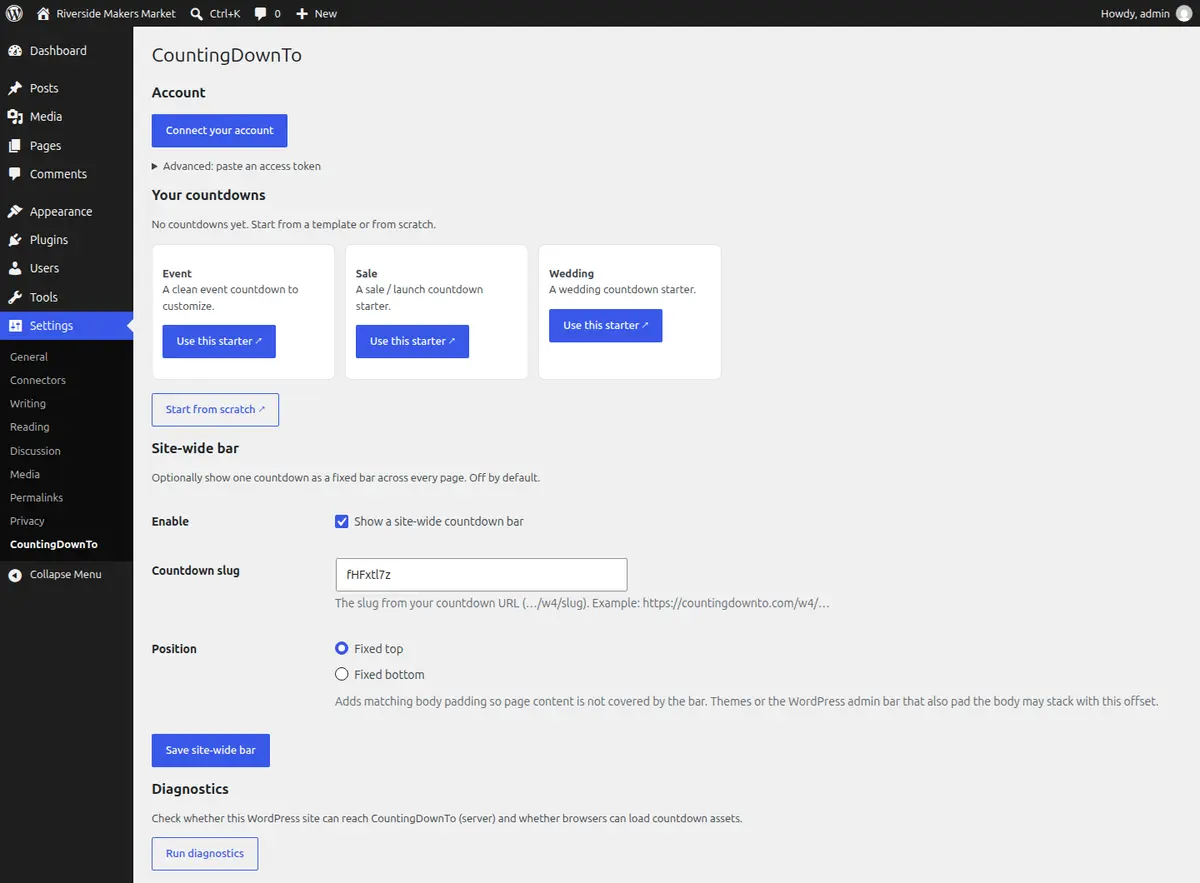
A free plugin that puts CountingDownTo countdowns on your WordPress site. You design the countdown on countingdownto.com, and changes you make there show on your site without editing the page.
What it does
- A Countdown block. In the block editor, add the Countdown block. Then create a new countdown (it opens countingdownto.com in a new tab, and the block picks the countdown up when you finish), choose one from your connected account, or paste a countdown link.
-
A shortcode
for classic themes and page builders:
[countingdownto slug="your-slug"]. You can useurlinstead ofslug, and setheight,aspect_ratioandlabel(the frame title read by screen readers). - A bar on every page. Optionally, show one countdown in a fixed bar across the top or bottom of every page of your site. Turn it on under Settings, CountingDownTo.
- Edits show everywhere. Designs are edited on countingdownto.com. When you save a change there, your WordPress pages show it without you editing them; visitors may need to reload the page to see it. The same countdown also works on other websites and as a page you can share.
- Free, with a small badge. Free countdowns show a small CountingDownTo badge. Paid plans remove it: $28 per month or $195 per year, in US dollars, as on our pricing page.
- Connecting your account lets you choose your countdowns from a list in the block editor. It needs your WordPress site to use https. Pasting a countdown link works on any site.
- At zero a countdown can show a message. A countdown that does not repeat can also hide itself or its buttons. A redirect at zero does not work inside WordPress: the countdown runs in a frame that cannot move your page to another address. The redirect does work when visitors open the countdown's own page on countingdownto.com.
How to install it
- In WordPress, go to Plugins, Add New, and search for CountingDownTo. Or download it from its WordPress.org page.
- Install and activate it.
- Optional: open Settings, CountingDownTo, and click Connect your account.
- Add the Countdown block to a post or page, or paste the shortcode into classic content.
Visitors do not need an account. The plugin adds no tracking scripts. The plugin's page lists exactly what each part sends to countingdownto.com.
Screenshots


How it compares with other WordPress countdowns
Many WordPress sites already have a free countdown block, and several are lighter than ours. Below we show where ours is better, where it is level, and where another option is the better choice. Checked on 4 November 2026.
How to read the tables. Verified means we tested it ourselves on a WordPress site (see how we tested). Advertised means the company's own page says so, including ours; we link the page. We read every other company's page on 4 November 2026 from New Zealand; prices are in US dollars as the pages showed them. Unknown means we could not check, or the page does not say. For more about our own product, see our product facts and our comparison of website embeds.
Something wrong or out of date? Email [email protected] with a link to the page that shows it, and we will check it and correct this page.
WordPress countdown plugins
| What we compared | CountingDownTo | Kadence Blocks | HurryTimer Not in our clock or page weight tests | Countdown Block | Countdown Timer Block | Result |
|---|---|---|---|---|---|---|
| Price of the paid version |
CountingDownTo
Advertised
$28 per month or $195 per year. It removes the badge. Our pricing page |
Kadence Blocks
Unknown
Pro price not stated on the pages we read. Kadence Blocks on WordPress.org, checked 4 Nov 2026 from NZ |
HurryTimer(not in our clock or weight tests)
Advertised
$39 per year or $69 one-time for one site. $79 per year or $109 one-time for up to 5 sites. hurrytimer.com pricing, checked 4 Nov 2026 from NZ |
Countdown Block
Advertised
Free only. No paid version listed. Countdown Block on WordPress.org, checked 4 Nov 2026 from NZ |
Countdown Timer Block
Advertised
$29.99 one-time for one site, $79.99 for 3 sites, $199.99 for unlimited sites. bplugins.com pricing, checked 4 Nov 2026 from NZ |
Result
They are better
HurryTimer and Countdown Timer Block cost less for one site, and Countdown Block is free |
| Branding on the free version |
CountingDownTo
Advertised
A small CountingDownTo badge. Our product facts |
Kadence Blocks
Verified
None on the page in our test. Our test, 4 Nov 2026 |
HurryTimer(not in our clock or weight tests)
Unknown
Not tested. |
Countdown Block
Verified
None on the page in our test. Our test, 4 Nov 2026 |
Countdown Timer Block
Verified
None on the page in our test. Our test, 4 Nov 2026 |
Result
They are better
Kadence Blocks, Countdown Block and Countdown Timer Block showed no branding in our test |
| Setting up a countdown |
CountingDownTo
Verified
The block opens countingdownto.com in a new tab to make the countdown, lists your countdowns once your account is connected, or takes a pasted countdown link. Our test, 4 Nov 2026 |
Kadence Blocks
Verified
Showed a running countdown as soon as we added the block. The date is in the block settings. Our test, 4 Nov 2026 |
HurryTimer(not in our clock or weight tests)
Advertised
Made in its own settings screen, then placed with a shortcode. HurryTimer on WordPress.org, checked 4 Nov 2026 from NZ |
Countdown Block
Verified
The date and design are in the block settings. Our test, 4 Nov 2026 |
Countdown Timer Block
Verified
Showed a running countdown as soon as we added the block. The date is in the block settings. Our test, 4 Nov 2026 |
Result
They are better
The three blocks are set up inside WordPress. Ours needs a visit to countingdownto.com or a connected account first |
| Correct time when the visitor's device clock is wrong |
CountingDownTo
Verified
Stayed correct with the device clock 1 day fast and with it 20 minutes slow. Our test, 4 Nov 2026 |
Kadence Blocks
Verified
Followed the device clock: 1 day short with it 1 day fast, and 20 minutes long with it 20 minutes slow. Our test, 4 Nov 2026 |
HurryTimer(not in our clock or weight tests)
Unknown
Not tested. |
Countdown Block
Unknown
Not tested: our test countdown had no future date set. Our test, 4 Nov 2026 |
Countdown Timer Block
Verified
Followed the device clock: 1 day short with it 1 day fast, and 20 minutes long with it 20 minutes slow. Our test, 4 Nov 2026 |
Result
We are better
Ours stayed correct with the visitor's clock 1 day fast or 20 minutes slow, where Kadence Blocks and Countdown Timer Block did not |
|
Data added to the page, one countdown
Measured once on a desktop, against the same post with no countdown. Shifts inside a countdown's own frame were not measured. |
CountingDownTo
Verified
77.6 KB and 6 requests, including a font used by the design we tested. No layout shift on the post. Our test, 4 Nov 2026 |
Kadence Blocks
Verified
13.5 KB and 4 requests. No layout shift on the post. Our test, 4 Nov 2026 |
HurryTimer(not in our clock or weight tests)
Unknown
Not tested. |
Countdown Block
Verified
8.4 KB and 5 requests. No layout shift on the post. Our test, 4 Nov 2026 |
Countdown Timer Block
Verified
277.8 KB and 5 requests. Layout shift on the post 0.024. Our test, 4 Nov 2026 |
Result
They are better
Kadence Blocks and Countdown Block added less. Countdown Timer Block added more |
| A timer for each visitor (evergreen) |
CountingDownTo
Advertised
Free, with the badge. Our product facts |
Kadence Blocks
Advertised
Pro only. Kadence Blocks on WordPress.org, checked 4 Nov 2026 from NZ |
HurryTimer(not in our clock or weight tests)
Advertised
Free. HurryTimer on WordPress.org, checked 4 Nov 2026 from NZ |
Countdown Block
Verified
The free block has an "Evergreen Timer?" switch. We did not test it. Our test, 4 Nov 2026 |
Countdown Timer Block
Unknown
Not stated. Countdown Timer Block on WordPress.org, checked 4 Nov 2026 from NZ |
Result
Level
Level with HurryTimer and Countdown Block. Pro only in Kadence Blocks |
| Repeating countdown |
CountingDownTo
Advertised
Free: hourly, daily, weekly, monthly or yearly. Our product facts |
Kadence Blocks
Unknown
Not clear. Its docs say a Pro evergreen timer can repeat for each visitor. Kadence countdown block docs, checked 4 Nov 2026 from NZ |
HurryTimer(not in our clock or weight tests)
Advertised
Pro only. HurryTimer on WordPress.org, checked 4 Nov 2026 from NZ |
Countdown Block
Unknown
Not described. Its changelog lists an "auto repeater". Countdown Block on WordPress.org, checked 4 Nov 2026 from NZ |
Countdown Timer Block
Unknown
Not stated. Countdown Timer Block on WordPress.org, checked 4 Nov 2026 from NZ |
Result
We are better
Better than HurryTimer, where it is Pro only. Not clear for the others |
| Bar at the top or bottom of every page |
CountingDownTo
Advertised
Free, in the plugin settings. Our plugin on WordPress.org, checked 4 Nov 2026 from NZ |
Kadence Blocks
Unknown
Not stated. Kadence Blocks on WordPress.org, checked 4 Nov 2026 from NZ |
HurryTimer(not in our clock or weight tests)
Advertised
Pro only. HurryTimer on WordPress.org, checked 4 Nov 2026 from NZ |
Countdown Block
Unknown
Not stated. Countdown Block on WordPress.org, checked 4 Nov 2026 from NZ |
Countdown Timer Block
Unknown
Not stated. Countdown Timer Block on WordPress.org, checked 4 Nov 2026 from NZ |
Result
We are better
Better than HurryTimer, where it is Pro only. Not stated for the others |
| When the countdown reaches zero |
CountingDownTo
Advertised
Free: show a message. If it does not repeat, it can also hide itself or its buttons. It cannot send the visitor to another page from inside WordPress. Our plugin on WordPress.org, checked 4 Nov 2026 from NZ |
Kadence Blocks
Advertised
Free: shows zero. Pro: hide, show other content, or redirect. Kadence countdown block docs, checked 4 Nov 2026 from NZ |
HurryTimer(not in our clock or weight tests)
Advertised
Free: hide, show a message, or redirect. HurryTimer on WordPress.org, checked 4 Nov 2026 from NZ |
Countdown Block
Unknown
Not stated. Countdown Block on WordPress.org, checked 4 Nov 2026 from NZ |
Countdown Timer Block
Advertised
Pro: show other content, or hide. Countdown Timer Block on WordPress.org, checked 4 Nov 2026 from NZ |
Result
They are better
HurryTimer can redirect for free, and Kadence Blocks Pro can redirect. Ours cannot inside WordPress |
Page builders and hosted widgets
If your site uses Elementor Pro or Divi, you already have a countdown. Elfsight is a hosted widget, like ours. We did not test these three on a WordPress site. On our website embeds comparison, Elfsight's public demo followed the device clock when it was wrong.
| What we compared | CountingDownTo | Elementor Pro | Divi | Elfsight | Result |
|---|---|---|---|---|---|
| Price |
CountingDownTo
Advertised
$28 per month or $195 per year, to remove the badge. The countdowns are free. Our pricing page |
Elementor Pro
Advertised
The free Elementor has no countdown widget. Plans with it start at $60 per year for one site. elementor.com pricing, checked 4 Nov 2026 from NZ |
Divi
Advertised
$89 per year or $249 one-time, for unlimited sites. Its Countdown Timer module is built in. elegantthemes.com Divi page, checked 4 Nov 2026 from NZ |
Elfsight
Advertised
Free for 1 widget with Elfsight branding. Paid plans from $5 a month, billed yearly. elfsight.com pricing, checked 4 Nov 2026 from NZ |
Result
They are better
Their lowest paid prices are below ours per year, and Elementor Pro and Divi include a page builder |
| A timer for each visitor (evergreen) |
CountingDownTo
Advertised
Free, with the badge. Our product facts |
Elementor Pro
Advertised
Yes: a Due Date or an Evergreen Timer. Elementor help, checked 4 Nov 2026 from NZ |
Divi
Unknown
Not stated in its module guide. Elegant Themes help, checked 4 Nov 2026 from NZ |
Elfsight
Advertised
Yes: a Personal Countdown for each visitor. elfsight.com countdown page, checked 4 Nov 2026 from NZ |
Result
Level
Level with Elementor Pro and Elfsight. Not stated for Divi |
| When the countdown reaches zero |
CountingDownTo
Advertised
Free: show a message. If it does not repeat, it can also hide itself or its buttons. It cannot send the visitor to another page from inside WordPress. Our plugin on WordPress.org, checked 4 Nov 2026 from NZ |
Elementor Pro
Advertised
Redirect, hide, or show a message. Elementor help, checked 4 Nov 2026 from NZ |
Divi
Unknown
Not stated in its module guide. Elegant Themes help, checked 4 Nov 2026 from NZ |
Elfsight
Advertised
Hide, show a message, or redirect. elfsight.com countdown page, checked 4 Nov 2026 from NZ |
Result
They are better
Elementor Pro and Elfsight can redirect. Ours cannot inside WordPress |
| View limits |
CountingDownTo
Advertised
No limit on any plan. This is our current policy. Our product facts |
Elementor Pro
Unknown
Not stated. |
Divi
Unknown
Not stated. |
Elfsight
Advertised
200 views a month on the free plan, 5,000 on the $5 plan. elfsight.com pricing, checked 4 Nov 2026 from NZ |
Result
We are better
Better than Elfsight's free and $5 plans. Not stated for the others |
When another option is the better choice
- Choose Kadence Blocks if you already use it and need a fixed-date countdown with no branding. It added 13.5 KB to the page in our test. Kadence Blocks on WordPress.org, checked 4 Nov 2026 from NZ
- Choose HurryTimer if you need a redirect at zero, or timers on WooCommerce product pages, in a free plugin. HurryTimer on WordPress.org, checked 4 Nov 2026 from NZ
- Choose Countdown Block if you want the lightest countdown we measured (8.4 KB) and no paid version. Countdown Block on WordPress.org, checked 4 Nov 2026 from NZ
- Choose Countdown Timer Block if you prefer a one-time payment: its Pro version is $29.99 for one site. bplugins.com pricing, checked 4 Nov 2026 from NZ
- Choose Elementor Pro if you already pay for it. Its countdown has an evergreen timer and can redirect at zero. Elementor help, checked 4 Nov 2026 from NZ
- Choose Divi if you already use it. Its Countdown Timer module is built in. Elegant Themes help, checked 4 Nov 2026 from NZ
- Choose Elfsight if you already use its other widgets and want them in one account. elfsight.com countdown page, checked 4 Nov 2026 from NZ
How we tested
- On 4 November 2026 we installed each plugin from WordPress.org on a WordPress 7.1.4 site on our own machine, and made one post per plugin with one countdown. We set each countdown to the same date and time, except Countdown Block, where the date stayed at its default, so it showed zeros. A post with no countdown was the baseline.
- For setup, we added each block in the block editor and noted what it showed. HurryTimer was not in the clock or page weight tests.
- For page weight, each post was loaded once in a new Chromium browser with an empty cache and no cookies, in a 1280 by 900 window. We counted everything loaded in the 6 seconds after the page loaded, including inside frames, and subtracted the baseline post. Layout shift was measured on the post itself, not inside a countdown's own frame. One run each, so small differences are rough.
- For the clock test, we replaced the browser's clock in the page and in every frame with one 1 day fast, then one 20 minutes slow, read the countdown 6 seconds after loading, and compared it with a run with the correct clock.
- These are lab results from one machine. The order of the results is more useful than the exact figures.